
An envelope can be part of the invitation’s design, not just a frame around the message. Wedding invitations with envelope animation make the reveal part of the experience, with an envelope and invitation designed to suit the celebration. The envelope opens like a letter, giving guests a warm first glimpse of the announcement.
It’s natural to want an invitation that feels personal while keeping essential details easy to read. This guide explains how animated envelope invitations work and how their design can reflect your wedding, from the overall style to the envelope reveal. You’ll also learn what to consider so the movement suits the occasion and the message stays clear.
Key Takeaways
- Understand how an animated envelope reveal turns a digital invitation into a letter-like announcement.
- Compare animated, video, and static formats to choose how you want guests to experience the invitation.
- Explore ways to shape the envelope and invitation design around your wedding’s look and essential details.
- Learn what to consider when choosing an app or website to create an animated invitation.
What Is an Animated Envelope Invitation?
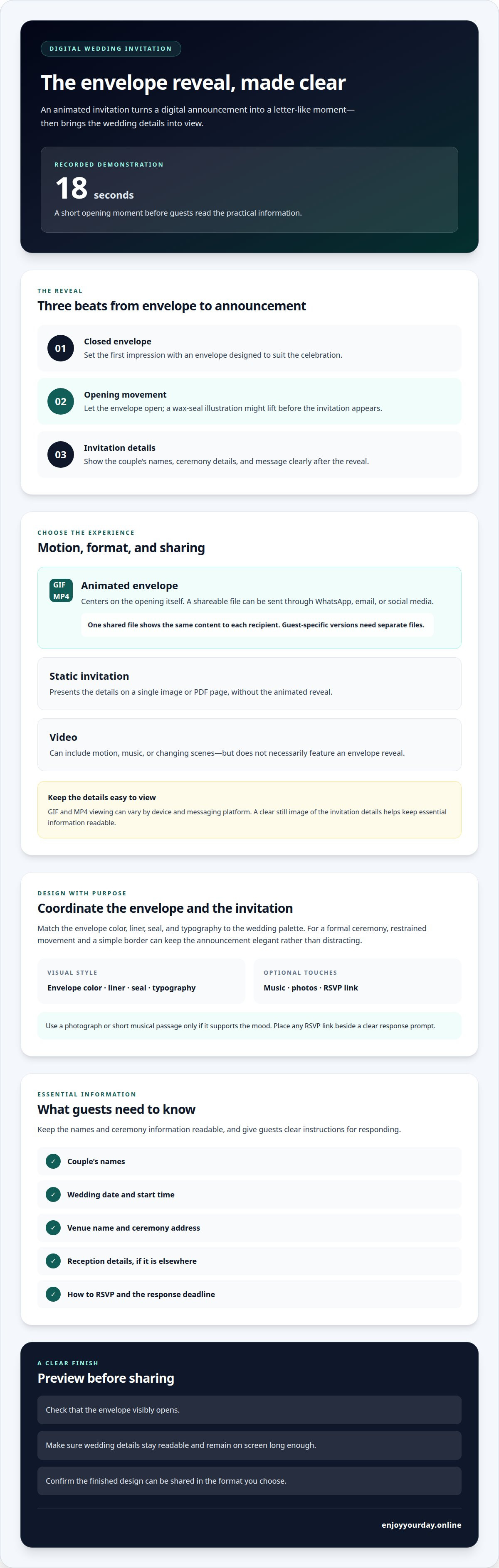
An animated envelope invitation brings a letter-like reveal to a digital wedding announcement. The envelope appears first, then opens to show the names, ceremony details, and message. In a recorded demonstration, the reveal runs about 18 seconds. That movement creates a short opening moment before guests read the practical information.
A static invitation presents its details on a single image or PDF page. A video can include motion, music, or changing scenes, but it does not necessarily feature an envelope reveal. An animated invitation centers on the opening itself. For example, a wax-seal illustration might lift before the invitation comes into view.
The format affects how the invitation is shared. A GIF or MP4 file can be sent through WhatsApp, email, or social media. A shared file shows the same content to each recipient. If each guest needs a personalized version, each version must be a separate file. A PDF or image stays still, and it doesn’t manage guest lists or track responses; those functions depend on associated services.
How much do digital animated wedding invitations cost? The cost depends on the design, the animation, and whether the invitation is personalized. A simple envelope reveal and a more elaborate sequence involve different creative work, so compare what each design includes rather than judging by motion alone.
To send one by text, email, or social media, choose a shareable file and attach or upload it to your message. Add a short note with the couple’s names or wedding date so guests recognize the invitation.
For iPhone, Android, and desktop, the key is whether the recipient’s app or browser supports the file format. GIFs and MP4s are common digital formats, but the viewing experience can vary by device and messaging platform. A clear still image of the invitation details helps keep the essential information easy to read.
A listing includes 1 custom animated wedding invitation video in MP4 format. A shared MP4 or GIF invitation file shows the same content to every guest who receives it, while personalized versions must be separate files. This distinction can help couples choose between a consistent invitation and guest-specific versions.
Wedding invitation design and envelope customization
A coordinated design links the envelope reveal to the wedding’s visual style. The couple’s names, event details, and a clear response option give the animation a purpose.
Apps and Websites for Creating Invitations
Invitation websites and apps let couples combine text, images, and motion in a digital design. The available layouts and sharing options shape how the finished invitation looks and reaches guests. For example, a design might pair a garden illustration with serif lettering and an envelope-opening sequence. Choose a layout with enough space for the couple’s names and ceremony details to remain readable.
Creating an Opening Envelope Animation
Keep the reveal in a clear sequence: show the closed envelope, open it, then present the invitation. This gives the animation a beginning and leads naturally to the wedding details. Match the envelope color, liner, seal, and typography to the wedding palette. For a formal ceremony, restrained movement and a simple border can keep the announcement elegant rather than distracting.
In the United States, digital invitations can follow the same courteous principles as paper ones: address guests clearly, include complete event information, and make response instructions easy to find. Choose wording that reflects the wedding’s formality, such as “request the pleasure of your company” or a warmer, informal greeting.
A design may include music, photos, RSVP links, and wedding details. Use a photograph or short musical passage only if it supports the mood, and place any RSVP link beside a clear response prompt.
Include the couple’s names, wedding date, start time, venue name, and ceremony address. Add reception details if the reception is elsewhere. For the RSVP, explain how guests should respond and give the response deadline. If you include a link, make sure it leads directly to the reply form.
To explore a design for your celebration, browse animated wedding invitation cards and consider how the envelope reveal can introduce your details.
For a personalized invitation, provide the couple’s names, wedding date and time, ceremony address, and RSVP details so the design reflects the event.
Where can I make animated wedding invitations with an opening envelope?
Create an invitation with a digital invitation maker that includes an envelope-opening effect, or use an animation editor to build the reveal. A ready-made invitation layout suits couples who want a simpler process. An editor offers more control over the sequence, such as showing a seal before the card appears.
Before choosing a tool, preview a finished invitation. Check that the envelope visibly opens, the wedding details are readable, and the design can be shared with guests. A template showing only a closed envelope may not include the animated reveal you want.
A digital invitation card brings the envelope, announcement, and event details together in one design. It suits couples who prefer a composed card to building animated elements themselves. Compare styles, such as a floral envelope and a minimal design, and choose one that fits the ceremony.
An animation editor gives you a more hands-on approach. Arrange the sequence: closed envelope, opening movement, then invitation text. Keep the names and ceremony information on screen long enough to read. Preview the result to catch details that move too quickly or sit too close to the edge.
Personalization also affects how you prepare the invitation. One shared design presents the same names and details to everyone; addressing each guest individually requires a separate version for each. Decide which approach you want before choosing how to create the invitation.
For a polished result, compare design options, preview clarity, and how easily you can share the finished invitation. A simple envelope reveal can be enough. Extra movement should introduce the wedding, not compete with its essential details.
What are the best apps and websites for animated wedding invitations?
Choose a design that includes an opening-envelope effect and keeps wedding details clear. A ready-made invitation card can simplify the design process, while an animation editor offers more control over the reveal. For example, a floral design may be easier to adapt than building every moving detail yourself.
Compare tools by the design choices they offer, the amount of editing they allow, and how they present a finished preview. Look for an envelope that visibly opens, editable names and ceremony details, and text that stays readable on a phone screen. A polished preview helps reveal cramped wording or an animation that moves too quickly.
Consider these points before choosing:
- Envelope effect: Check that the design includes an opening movement, not only an envelope illustration.
- Personalization: See whether you can change names, colors, wording, and event details.
- Preview: Review the complete sequence, including the moment the invitation appears.
- Sharing: Choose an output or sharing method that suits how you plan to reach guests.
A ready-made design suits couples who want a composed invitation without making every creative decision. An animation editor suits those who want to arrange the reveal themselves, such as showing a seal before the card opens. Either way, keep the sequence focused on the invitation and avoid movement that distracts from the date or venue.
Before choosing a design, review it with the final wording. Check the names, ceremony time, venue, and response instructions in the preview. If the invitation includes a photo or music, make sure they complement the envelope and do not obscure important details.
To see a ready-made approach, explore animated wedding invitation designs and find a style that suits your celebration.
EnjoyYourDay: Birthday invitation cards
EnjoyYourDay creates animated digital wedding invitation cards for couples who want their announcement to unfold like a letter. Each card displays an envelope that opens on a phone to reveal the sender’s message, adding a sense of occasion to the first impression.
For wedding invitations, choose a theme that suits the celebration and use the design to introduce your message. EnjoyYourDay offers wedding invitation cards among its 45 themes. The same invitation style can also suit a birthday, baby shower, or baptism, with each announcement tailored to its own gathering.
If an animated digital invitation fits the way you want to share your celebration, visit EnjoyYourDay online.
Choose a reveal that feels like your celebration
Let the invitation’s opening reflect the atmosphere you want to create. A quiet reveal may suit an intimate ceremony, while brighter colors and lively movement may suit a joyful gathering. Choose details that feel true to you, and keep the wording clear and welcoming.
As you choose a design, consider how it will introduce the day to your guests. Wedding invitations with envelope animation make the first impression feel personal, while a simple composition keeps attention on your announcement. EnjoyYourDay offers animated wedding invitation cards, as well as cards for birthdays and baby showers.
Ready to explore an invitation for your occasion? Contact EnjoyYourDay about your invitations, and take the next step toward sharing your celebration with warmth.
Frequently Asked Questions
Can the envelope be customized?
Yes. Choose an envelope style that complements the wedding, then pair it with a message containing the couple’s names and event details. A formal celebration may suit a restrained design, while a garden wedding could inspire botanical details. The envelope creates the first impression, so choose a style that feels connected to the occasion and leaves room for the announcement.
What are wedding invitations with envelope animation?
They are digital invitations that begin with an animated envelope opening to reveal the wedding announcement. The envelope is a visual introduction, not a physical item sent through the mail. A guest can open the message on a phone and watch the envelope unfold into the invitation, where the couple’s names and essential celebration details appear.
What are the pros and cons of animated digital invitations versus printed invitations?
Animated digital invitations add movement and can be shared electronically, which is convenient for guests who receive messages online. Their main limitation is that guests need a suitable device to view them. Printed invitations offer a physical keepsake, but must be produced and delivered. Consider whether a screen-based reveal or a tangible memento better suits your celebration and guests.


